IT NEWS & RESOURCES
ABOUT
The IT page provides employees with essential tools, guides and support to keep your technology running smoothly.
DEVICES
Desktop Settings
Available 7 Days A Week
IT SUPPORT – GUARDIAN IT

When there is a need for support from an IT resource, it is important that the correct people are notified, and that appropriate subject is applied to ensure a timely response.
All support requests should be emailed to the email group = ITSUPPORT.
When entering a support ticket on behalf of the entire terminal, ensure that you will be available as the primary point of contact.
If you will not, please include other terminal staff in the email chain so that GuardianIT knows who to contact to assist with the ticket support.
All these guidelines are important and must be followed for communication between ETL and GuardianIT to remain clear and consistent. Please help us by following the guidelines. If you have any related questions, please contact Greg@energytransportlogistics.com.
What is GuardianIT's business hours?
Standard Business Hours of Support for Geeks2you is from 07:00 MST – 18:00 MST Mon-Fri.
After hours support is available Mon-Fri as well on the weekends. At times Geeks2You staff members may respond to these tickets in a similar time frame as standard business hours. However, that is not an expectation for non-urgent tickets. If you enter a support ticket during afterhours support, it may not be addressed until the next business day.
If there is a critical support ticket after hours, please enter the ticket and contact me. I will follow up with on-call staff at Geeks2you to ensure that the issue is addressed.
What is considered an "URGENT" IT Support Ticket?
If you have a critical support issue that requires an urgent response, please include “URGENT” in both the subject line and within the body of the ITSUPPORT. This will help with decision making on prioritizing tickets as they come into the system.
An “URGENT” ticket only involves a complete terminal outage, a primary hardware failure, or a user unable to access terminal services.
Resetting user passwords that were not properly retained or coaching users how to navigate basic Windows functions are not “URGENT” and should not be entered as such.
Please do not use other phrases such as “immediate support needed” as well.
When a support ticket is entered, include as many details as possible (including screen shots when possible). Do not enter a support ticket with a vague subject such as “need support”.
There are support staff with different levels of experience that can respond to tickets more efficiently. The more details within the ticket will likely get the best staff member assigned to complete the assignment.
If you send an urgent IT support ticket and it is after normal business hours, please call GuardianIT at 520-226-4441.”
What is the email for GuardianIT Support?
Email ITSUPPORT
What is the Guest Wifi Password?
Geeks2You has confirmed that all terminals have a Guest Wi-Fi account available. We encourage anyone that needs to use our network with a personal device (cell phones, etc), to only connect to the Guest Wi-Fi account.
The Guest Wi-Fi password is: energy01
Separating guest network traffic from the primary network will help us to maintain the strongest bandwidth available for business needs.
Explore Links
3PL
Acordex
Customer Portal
Front Support
Infiniti
Microsoft 365 Training
Ricoh Sanner
Zebra
wAREHOUSING
3PL
Our CLX and PHX locations use improved 3PL technology to manage warehouse needs.
Visit https://app.extensiv.com/hub/landing to learn more.
Imaging
ACORDEX
Acordex has changed the URL address for the website that we use for both imaging and dispatch.
Please update your bookmarks with the following address: Login (safekeep/online)
Official
Customer Portal
Visit our customer portal at: https://portal.energytransportlogistics.com/alphaPortal/Tools/logon
Periodically customers contact their sales rep or customer service reporting that they cannot access our portal.
It is almost always a connectivity issue within their organization or an issue with how their browser is configured.
- Please click on the attached document that will be useful in helping our internal and external customers with our customer portal.
- Check out our new portal feature, “BOL UPLOAD”, on the attached document.
New Email Partner
Front
LAX is live with using Front as their email platform eff. 03/10/2025. Emails that are forwarded from Front to O365 will not have the customers email address in the To: or CC: field(s) when you reply.
Please watch for this and make sure to copy the customers email address from the previous thread before responding to the customer. This is particularly important for Customer Care, Quotes, and all terminal Ops boxes to watch for this.
Please contact Greg Lockwood if you have any questions.
Visit Front Support.
Training hub
INFINITI
Visit INFINITI.
Office
Microsoft 365
There are several tools available within Microsoft 365 that help us to improve our daily communication, organization and work efficiency. These are Outlook, OneDrive, Powerpoint, Sharepoint, Microsoft Teams and Access.
Visit Microsoft Support to learn more.
💡Access a Microsoft Teams Quick Start Guide here.
💡Access a Microsoft Teams Guide on How to Make Calls here.
Manager-HR
Ricoh Scanner
Terminal Guest Access
WIFI
Geeks2You has confirmed that all terminals have a Guest Wi-Fi account available. We encourage anyone that needs to use our network with a personal device (cell phones, etc), to only connect to the Guest Wi-Fi account.
The Guest Wi-Fi password is: energy01
Separating guest network traffic from the primary network will help us to maintain the strongest bandwidth available for business needs.
Label Printers
Zebra
Click on the following link to see a video tutorial on how to replace media on zebra label printers.
Note: Most terminals do NOT have ribbons. Please ignore that part of the video.
Alpha Truck News
AT UPDATES
New AT Protocols from our Director of IT:
If you have any questions on this please reach out to your immediate Manager or to Greg Lockwood for clarification.
Charges Screen Report Query Changes
A code change has been made that corrects several date conflicts that existed in the system. Primarily related to the service due date of shipments.
The charges screen now has an option to allow the query to be built based on the service due date instead of the shipping date. To change the query to service due date, select F6 and field Z will no longer read “Ship Date”.
The rest of the query build process remains the same. This new option will improve the accuracy of the dates we are using in reporting on-time delivery service.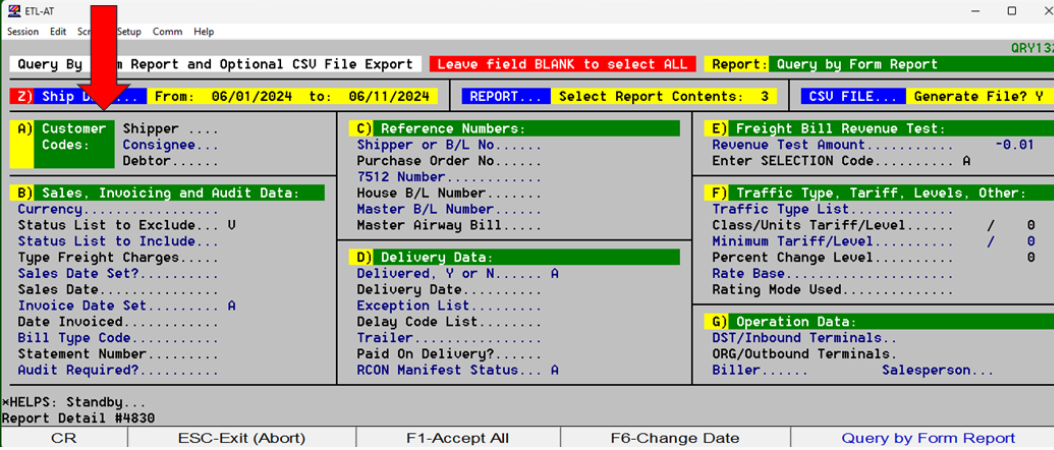
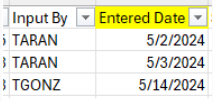
A new column “Entered Date” has been added to the CSV that the charges screen query creates.
This column has been inserted into the format next to “Input By”. The new field is column AT in the excel report.
Previously in the K Display, the system automatically displayed the “Due Date” of the order with the same date as the POD, regardless of the delivery schedule date on the order.
This has been corrected with the adjustments that were made related to date fields.
If you identify any unusual data changes, please contact Greg, as soon as possible.
““An ounce of prevention is worth a pound of cure.”
—Benjamin Franklin


Cybersecurity
It is critical that we all take cybersecurity seriously and follow all precautions to protect our company and your personal information. The number of cyber attacks on transportation companies has been on the rise over the past year. Recently one of our largest customers was attacked and had to shut down their global operations.
As part of our ongoing efforts to improve our cyber security, we are going to begin quarterly tests of phishing attacks. A phishing email is an email that is coming from a fake sender with the intent to get you to click the link (ie buy giftcards for the CEO) and potentially enter your login credentials/passwords on a website.
We will be sending out fake phishing emails every quarter to help train you in learning how to avoid these emails. Should you encounter one of these emails, please report it via the ‘Report Phising’ icon on your Outlook toolbar.
Once reported, it will remove the email from your inbox. Do not attempt to guess if the suspected phishing email is real or part of the test. When in doubt, do not select any links in an email, report the potential attack and let our support team determine the risk of the email.
If you happen to fall victim to the phishing email test, it will ask you to watch a training video. Please watch it to complete the training on this subject. We will be tracking who failed the phishing attack as well as the compliance of watching the follow up training video. Your supervisor will be contacted for follow up.
We are continuously using tools to search the “dark web”, a place where hackers trade information for any signs of ETL related login credentials. If the event the scan software identifies your login credentials, you will receive an email that instructs you to immediately change your password(s).
Stay Up to Date With The Latest News & Updates
Back to Basics
Refresh AT skills and best practices.
See Our Newsletter
Energy Nexus Newsletter brought to you by Erik Lopez posts every month.
Let’s Connect
Please follow us on LinkedIN.