
Discover Your HR Hub
Human Resources
Explore comprehensive HR resources, internal job postings, and essential employee information all in one place.
Essential HR Resources
Employee Forms and How to Guides
Workplace Resources
Career Opportunities
- Job Postings
- Training Workshops
- Leadership Training – (Please contact your manager.)
Open Enrollment Details
Important Open Enrollment Information
💡Annual Open Enrollment begins this Friday, November 21, and closes on Friday, December 5, 2025. This will be the only opportunity for you to enroll, drop, or change medical, dental, vision, disability, or supplemental benefits for the 2026 calendar year.
PLEASE NOTE:
- No changes are being made to plan providers in 2026. Nevertheless, we strongly encourage you to review the attached 2026 Benefits Guide as it contains plan updates and new rates for our various insurance plans.
- Voluntary Term Life is being offered as a new benefit in 2026. If elected, this life insurance would be in addition to the company provided (free) $25,000 basic life insurance coverage. You may enroll yourself, spouse, and/or children in the plan. Be sure to review page 19 of the attached 2026 Benefits Guide for details.
To make this Annual Open Enrollment process as easy as possible for you, we made ONE MAJOR CHANGE this year. If you do not want to make any changes to your current benefits, no action is required from you. Your current benefits will automatically rollover into 2026 at the appropriate new rates. Therefore, only employees wanting to enroll, drop, or change medical, dental, vision, disability, or supplemental benefits need to take action.
Please watch for a Paycom notification on Friday announcing Open Enrollment is now available. In true Paycom fashion, you will receive multiple reminders through the close of Open Enrollment on Friday, December 5. Again, please remember if you want your current benefits to rollover into 2026, no action is required.
If you have any questions regarding the enrollment process or using Paycom, please don’t hesitate to contact your HR Team at hr@energytransportlogistics.com or x24
💡You can acess CURRENT 2025 benefit information here.
Use password: energy2025oe
Employee Benefits Overview
Comprehensive Benefits Package
At ENERGY TRANSPORT LOGISTICS, we pride ourselves on offering a robust benefits package designed to support the diverse needs of our employees. Our benefits include health insurance, retirement savings plans, paid time off, and wellness programs. For more detailed information, please visit our dedicated benefits page.
Use Password: energy2025oe
💡You are able to enroll in the 401(k) program throughout all of 2025.


Our benefits are tailored to ensure the well-being and satisfaction of our team members, providing them with the resources they need to thrive both professionally and personally.
2025/ 2026 Benefits Information & Enrollment Forms
2026 General Information
Open Enrollment for 2026 begins Friday, November 21, through Friday, December 5.
2026 Plans are effective January 1, 2026.
2026 General plan information and rates are available in the attached 2026 ETL Benefit Guide.
2025 General plan information and rates are available in the attached 2025 ETL Benefit Guide.
Temporary Insurance cards can be printed by visiting the Unted Health Care portal or the MYUHC app.
2026 ENROLLMENT begins 11/21/26-12/05/26
401k Benefits
ENROLLMENT OPEN-ENDED.
ETL encourages you to take advantage of your 401(k) plan and all the benefits that it offers you, so that you can look forward to a more secure financial future. ETL offers a 401(k)-match equal to 50% per $1.00 of your deferral into the plan for the first 9% of your eligible pay that you defer. 💡You are able to enroll in the 401(k) program throughout all of 2025.
📎401k Program Details
*Currently ENROLLED PARTICIPANT only:
Quarterly Benefit Statements: The quarterly benefit statement is generally available a few weeks after the quarter ends.
To view it:
1.) Log in to your account.
2.) Access your statements and documents from the website or the mobile app. Simply click on Statements and Documents from the link on the right side of the website homepage or from the menu bar on the left side of the mobile app.
*New* ENROLLEE only:
New enrollment: Please use the following links for imfofrmation on how to enroll online, as well as enroll in the program.
- 401k Enrollment Book – Spanish
- You may also click on this How to Enroll in 401k – GUIDE for a step-by-step breakdown of what to expect when first signing up for 401k.
401k PERSONAL IMPACT INFORMATION
OPEN
Enrolled Participants only
New Enrollees only
Latest HR POLICIES
Claims (UNUM)
Click on the below guide to file a claim for Unum benefits.
Expense Reports
Click on the below guides to assist with how to submit and approve non-mileage expense reports.
- NON-MILEAGE
📲 Mobile How to Submit a Non Mileage Expense Report
💻 Desktop How to Submit a Non Mileage Expense Report
- MILEAGE
📲Mobile How to Submit a Mileage Expense Report
💻Desktop How to Submit a Mileage Expense Report
Managers only:
For a guide on how to approve an expense report, please see the managerial page.
Employee Handbook
FMLA
MYUHC
Click on the below guides to assist with how to register your UHC accounts via mobile app or desktop.
- How to Register your UHC Account
📲 Mobile – Register myUHC account
💻 Desktop – myUHC_How to Register account
Performance Review
Access Performance Review information by visiting the Managerial How to Page.
Personal Information and W2 in Paycom
- Access or Update your Personal Information in Paycom
– Click on the following How to Access or Update Personal Information Guide. - Access your W2 and Tax Information
– Click on the following How to Access W2 and Tax Information Guide. - Add or Edit a Beneficiary or Dependent
– Click on the following How to Add or Edit a Beneficiary or Dependent Guide to review hoe to add or edit a beneficiary or dependent within the PayCom mobile app. - Change your Username or Password in Paycom
– Click on the following How to Change your Username or Password in Paycom Guide to change your username or password in Paycom.
You MUST have active credentials to use this guide. Otherwise, please use the “forgot” option under he Employee Self Login.
Managers only:
For approval or change guides on the above topics, please see the managerial page.
Time Management
Click on the below guides to assist with how to REQUEST or MANAGE time off in Paycom.
- How to Record Hours (HOURLY Employees only)
📲 Mobile How to Record Hours (Hourly Employees) – Mobile - SPANISH Version: How to Record Hours (HOURLY Employees only)
📲 Mobile How to Record Hours (Hourly Employees) – Mobile SPANISH - How to Record Hours (SALARY Employees only)
💻 Desktop How to Record Hours (Salary Employees) Guide
- Click on the following Paycom Guide to review how to approve your own Time Card. Your manager must approve any punch change requests, before you can approve your time card.
Managers only:
For a guide on how to approve time card requests, please see the managerial page.
Upcoming Events and Schedules
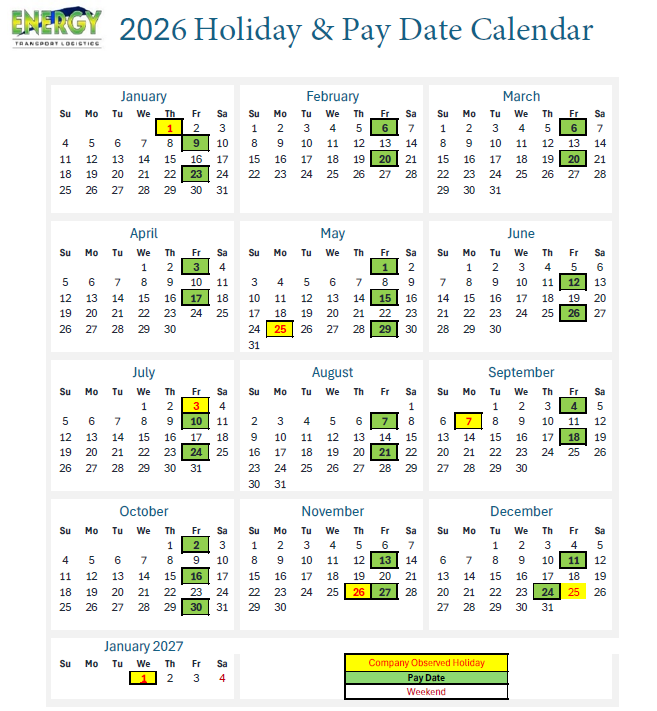
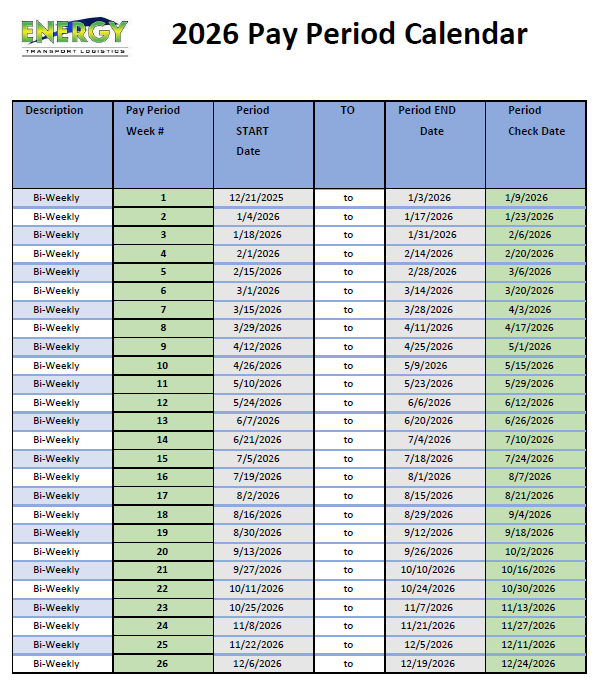
Payroll Processing Dates
beginning January 10, 2025

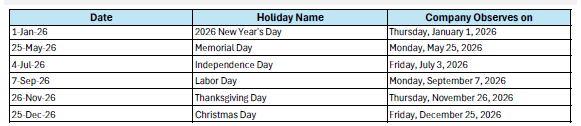
Holiday Schedule
2025

Employee Workshops
2025
Join our workshops to enhance your skills and advance your career.
Contact the Compliance and Safety Department for more information on the various training classes we offer.
2026 calendar printables
2026 HOLIDAY AND PAY DATE CALENDAR
2026 Pay Period Calendar
Need HR Assistance?
Our HR team is here to support you with any questions or concerns. Whether you need help with benefits, payroll, or career advice, don’t hesitate to reach out. We’re committed to providing the assistance you need to thrive at ENERGY TRANSPORT LOGISTICS.